Talk given at Hackaday Supercon 2025, November 2025.
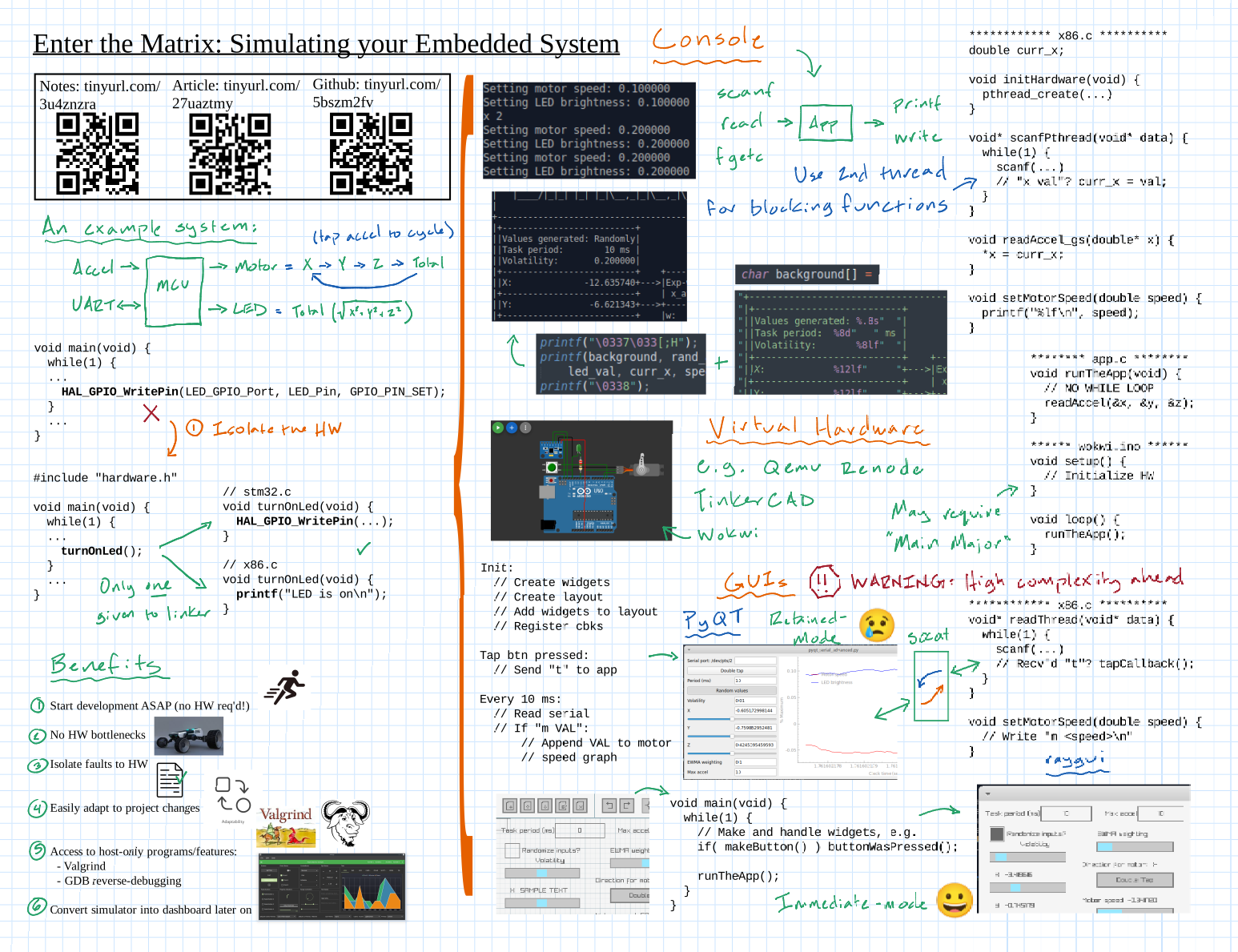
Simulation is one of those topics where the words sound straightforward but the practical gap between “this is possible” and “here’s how to actually do it” is surprisingly wide. I gave this talk at Supercon to close that gap — not assuming a big simulator budget or a week to learn a new tool, but starting from the realistic premise that you have a few hours and want something working right now.
The core architecture: isolating the madness
The fundamental move in all of the techniques I covered is the same: separate hardware-specific code into dedicated files or modules so that the application logic doesn’t know or care what platform it’s running on. Your application doesn’t need to know whether read_temperature() is calling an ADC, reading from a file, or returning a hardcoded constant. That separation is the whole game.
printf/scanf simulation
The simplest technique needs almost no tooling: replace GPIO outputs with printf() calls and sensor inputs with scanf() or getchar(). It sounds trivial, but it unlocks most of what you probably want — run your firmware on your laptop, print state to the terminal, and feed synthetic inputs without touching hardware. File-based input sequences make this repeatable and automatable.
For more readable output, VT100 escape codes let you build ASCII dashboards that update in place — useful for seeing system state at a glance rather than scrolling through a wall of terminal output.
Virtual hardware simulators
When you need more than a text interface — actual peripheral behavior, hardware timing, visual feedback — virtual hardware simulators are the next step. I surveyed the main options: Wokwi, Renode, QEMU, and Proteus. The key evaluation criteria aren’t just feature lists; they’re microcontroller support, learning curve, and how naturally they integrate with the build system you already have.
The Main Major pattern
One concrete architectural pattern that comes up repeatedly: separating the platform-specific main() from application logic. The “Main Major” pattern gives you a main_desktop.c and a main_embedded.c that each call the same application init and loop, so you switch platforms by swapping one file. Simple enough to add to an existing project in an afternoon.
GUIs and inter-process communication
For the final section, I covered two approaches to adding a graphical front end to a simulation: retained-mode frameworks like Qt and GTK, and immediate-mode frameworks like PySimpleGUI and raygui. I’m partial to immediate mode for embedded simulation work — the event loop model maps more naturally to non-blocking embedded code than the callback model does.
If your simulation needs to communicate with another process — say, a desktop GUI talking to an embedded firmware build over a virtual serial port — tools like socat or com2com can create virtual port pairs without any special hardware.
Additional Resources
- Simulating Your Embedded Project on Your Computer (Part 1) — printf/scanf simulation in depth: the written companion to this talk
- Simulating Your Embedded Project on Your Computer (Part 2) — virtual hardware simulators, PyQt GUIs, and inter-process communication