Originally published on EmbeddedRelated.
Part 2 of the simulation series picks up where the printf/scanf approach from Part 1 leaves off, exploring two more capable but more complex alternatives. The first is virtual hardware: tools like Wokwi, Renode, QEMU, TinkerCAD Circuits, and Proteus that aim to actually execute the target MCU’s instruction set and simulate connected peripherals. The article evaluates these tools on three practical axes — whether they support your specific MCU and components, how steep the learning curve is, and how easily they integrate with your existing build system — and is direct about the fact that even if your MCU is not supported, virtual hardware is often still useful for testing architecture and logic.
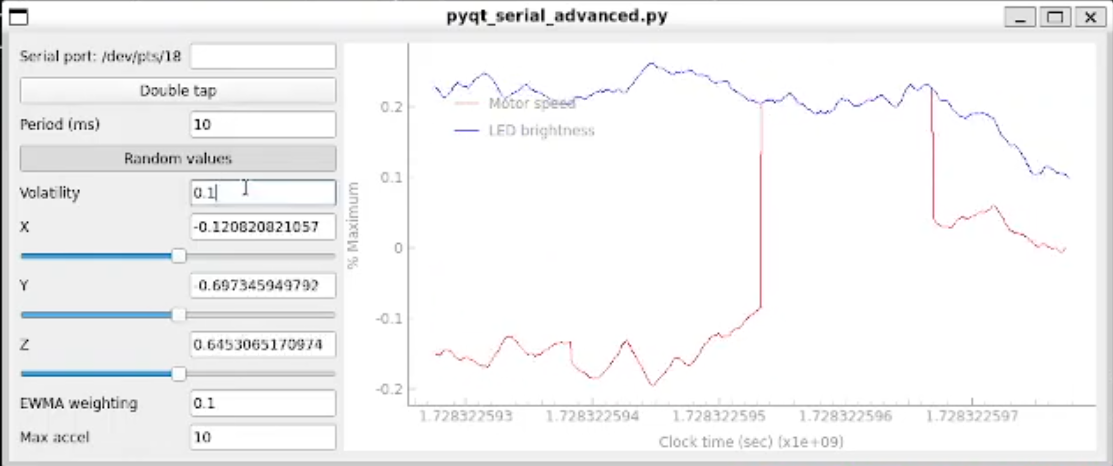
The second option is a GUI front end built with PyQt5: a Python application that replaces the terminal with buttons, sliders, labels, and other widgets, making the simulation feel more like the actual device and enabling input and output capabilities that printf/scanf cannot provide. The article walks through the three-step process of assigning the layout, programming event handlers, and moving data into and out of the GUI, along with a section on inter-process communication for passing data between the C embedded application and the Python front end.
Together, the three simulation approaches from Parts 1 and 2 cover a wide range of needs: the printf/scanf approach for a fast start, virtual hardware when you need hardware-accurate execution, and a GUI when you need a richer user experience or want to demonstrate the simulated device to someone unfamiliar with terminal output.
Additional Resources
- Enter the Matrix: Simulate Your Embedded System (Hackaday Supercon 2025) — a talk covering this material with a live demo