Originally published on EmbeddedRelated.
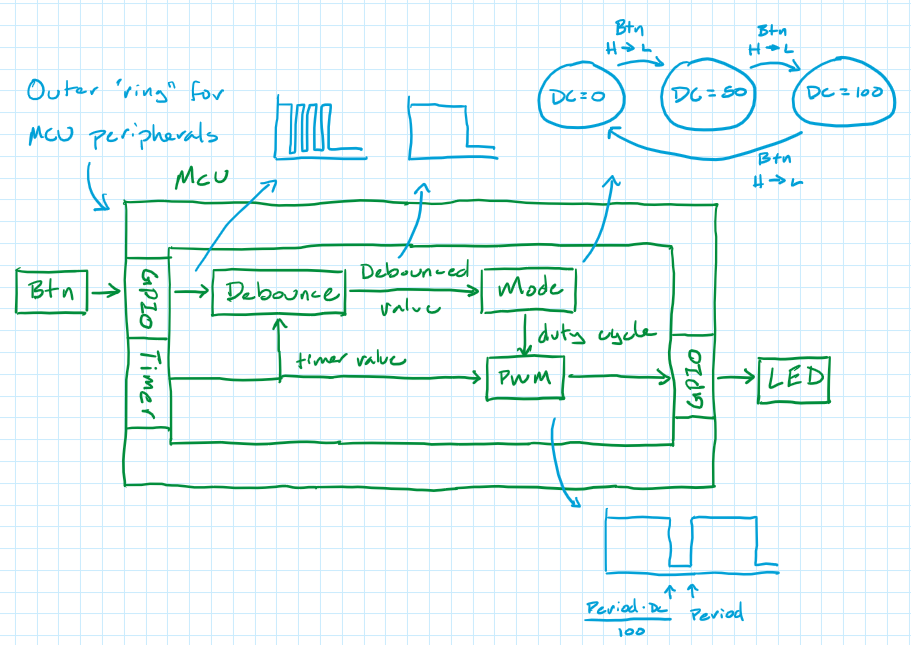
You would not assemble a complicated piece of hardware from a manual with no pictures. Why do we so often try to write or read code without a single diagram? This article makes the case for two specific kinds of graphical aids — software block diagrams and flowcharts — arguing that the ability to quickly sketch an appropriate diagram is one of the skills that most separates experienced engineers from novices. Block diagrams show the high-level architecture of a system: how functional blocks connect, what data flows between them, and which pieces of code own which behaviors. Flowcharts show the logic of a specific algorithm: what decisions are made, what happens in each branch, and how control flows from start to end.
Before writing code, an architectural sketch helps you think through a problem before committing to any one solution — and encourages modular design, which decades of studies have shown to be easier to write, test, and debug. When reading unfamiliar code, a diagram provides the roadmap the human brain needs to understand how any individual function fits into the larger application. The article gives practical guidance on what to include in each type of diagram, how to draw them, and how to translate them directly into code structure.
After covering the two diagram types, the article surveys four free tools that make creating them painless without requiring Microsoft Visio: Mermaid (text-to-diagram in Markdown), PlantUML (a broader diagram DSL), Flowgorithm (a graphical tool that can generate code from a flowchart), and ASCIIflow (for plain-text diagrams that live in source files). Two exercises close the article for readers who want to practice both diagram types on a concrete problem.